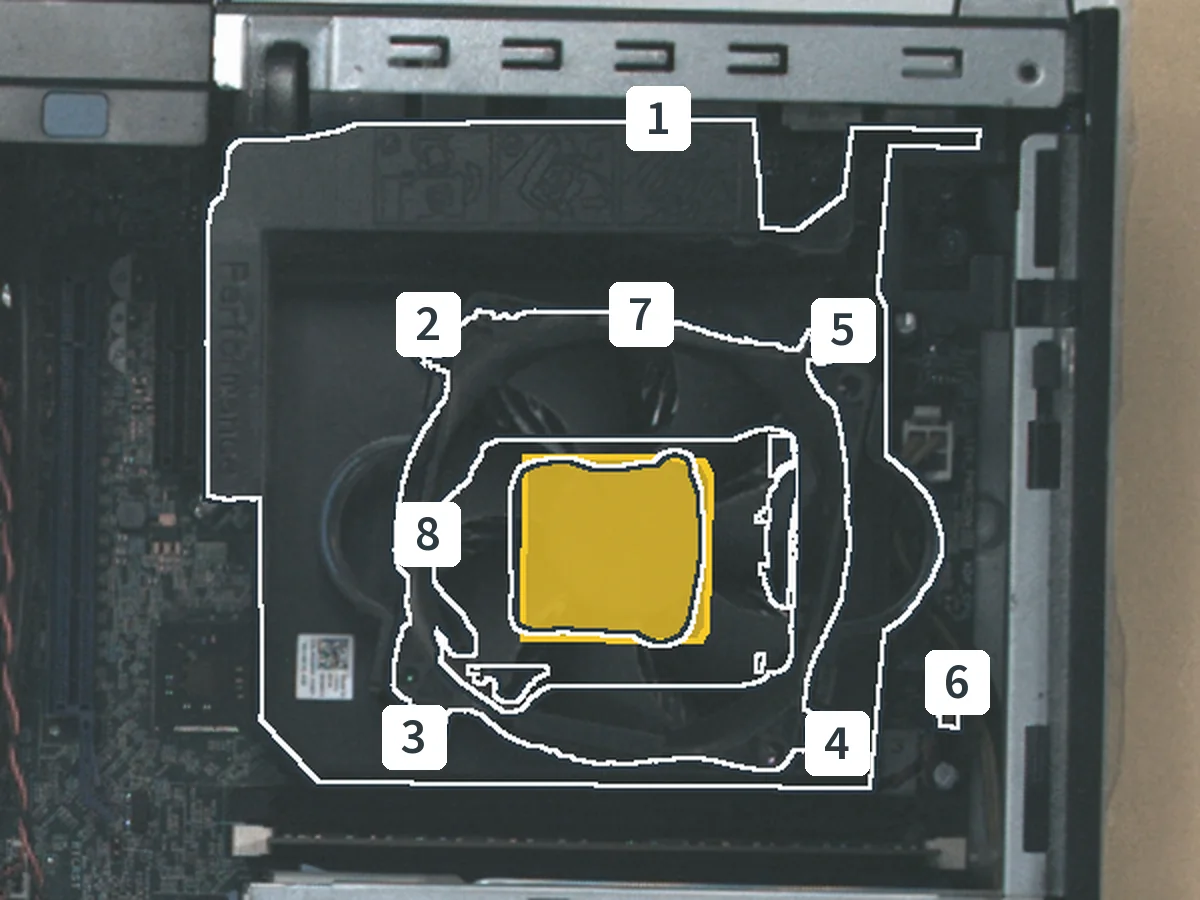
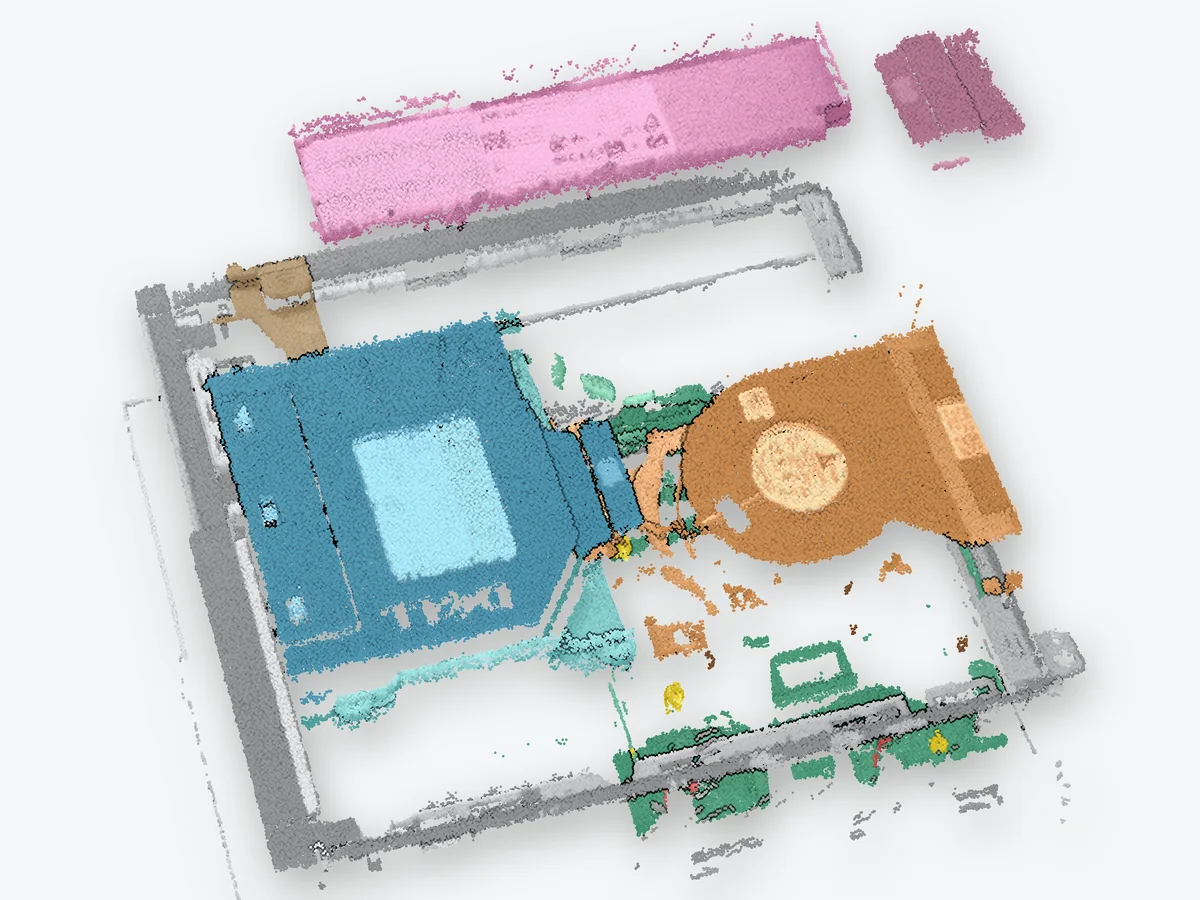
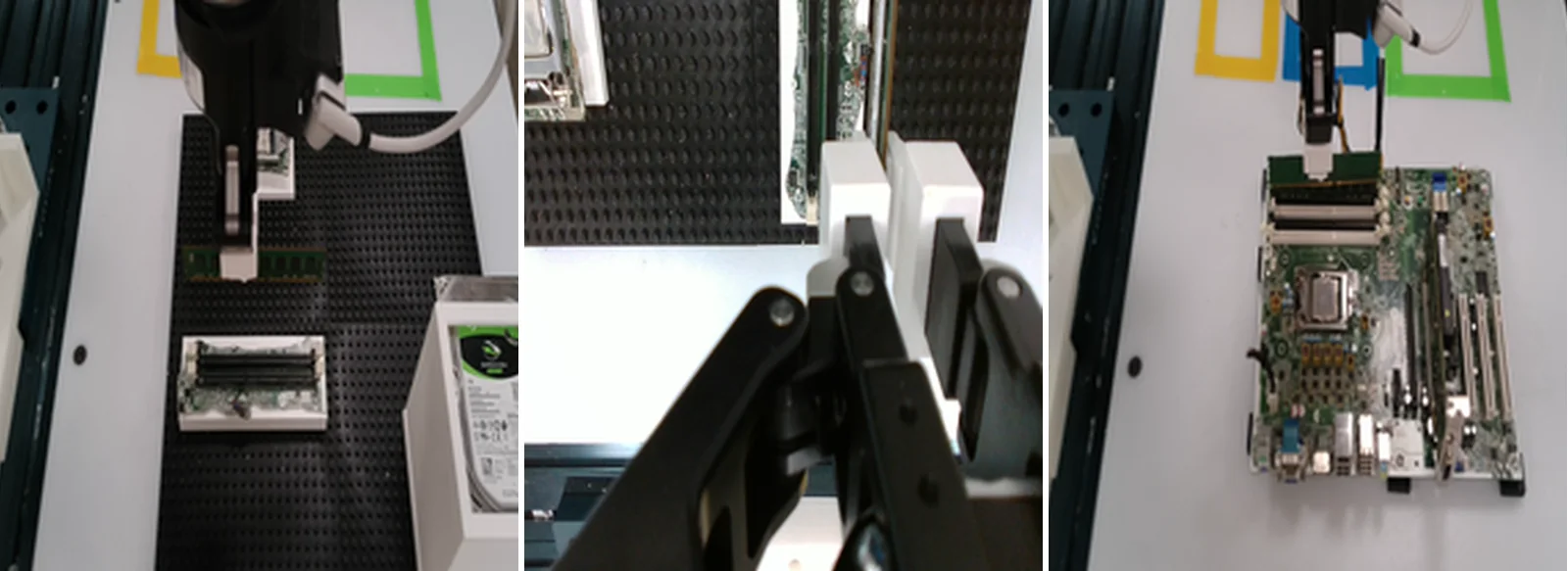
Everything in detail: how to download and read the data, what each part of it holds, how the benchmark tracks are scored, and the terms of use.
Download, load, evaluate
The data is hosted on Hugging Face in the repository ChangChrisLiu/E3D-Desktop-Disassembly. The repository still carries the dataset's earlier name, E3D-Desktop-Disassembly; it holds the same data as EoL3D.
Fetch the whole repository, or only the folders one task needs.
The hf command comes with the huggingface_hub Python package. The repository is public: no account or token is needed to read it. The commands are for a Unix shell; $DATA is the folder the data goes to.
Install the command
pip install "huggingface_hub>=1.0"     # provides the hf command
export DATA=$PWD/e3d                   # any folder
With huggingface_hub older than 1.0, use huggingface-cli download in place of hf download, with one --include followed by all the patterns.
Which folder holds what
Contents
Folders
Size
Instance segmentation and detection on the scanner view, with part states and relations
annotations/scanner/benchmarks/level1/
Size: 9.5 GB
Recognising parts outside the machine (the parts laid out after disassembly)
annotations/components/
Size: 0.26 GB
The scanner's 3D reconstructions, one labelled point cloud per step
reconstructions/scanner/
Size: 58.6 GB
Question answering on the images
vlm/vlmpack_2026-11-05/
Size: 31.8 GB
Operator video of the hands at work, faces masked
video/hand_work_selected/
Size: 140 GB
Every capture of the four views, as the capture rigs wrote it
raw/scanner/raw/oak/raw/realsense/
Size: about 372 GB
Robot demonstrations, one archive per episode, in two settings
raw/robot/
Size: about 519 GB
Part classes, states and verbs; the train and test split
taxonomy.yamlsplits.json
Size: small–
Sizes are approximate, in decimal gigabytes.
Load
Read one desktop of the scanner annotations, and the question-answer records.
Scanner annotations
One folder per desktop, annotations/scanner/D<nn>/. Step S01 is the untouched machine; every other image is taken after that step's operation.
images/S<nn>.png
The scanner image of step nn, 1600 × 1600 pixels.
labels/S<nn>.png
The label map: the instance id of each pixel (0 is background). Take a part's pixels from here; where two masks overlap, it gives each pixel to one part.
annotations.json
COCO: one annotation per part and step, with class, box, the visible and the complete (amodal) mask as RLE, visibility and occlusion. A part in place but fully covered has iscrowd 1 and an empty visible mask.
instances.json
Each part: key, class, relations, its state at every step and the step it leaves.
sequence.json, frames.json
Step names and operations, each part's state timeline, the source file of each image.
Python: one desktop
# pip install numpy pillow pycocotools
import json
import numpy as np
from PIL import Image
from pycocotools import mask as mask_utils

desk = "e3d/annotations/scanner/D01"                              # $DATA/annotations/scanner/D01
coco = json.load(open(f"{desk}/annotations.json"))
parts = json.load(open(f"{desk}/instances.json"))["instances"]    # keys are strings
img = coco["images"][0]                                           # the first step
picture = Image.open(f"{desk}/{img['file_name']}")                # the scanner image
labels = np.array(Image.open(f"{desk}/{img['label_file']}"))      # instance id per pixel
for ann in coco["annotations"]:
    if ann["image_id"] != img["id"] or ann["iscrowd"]:            # iscrowd: fully covered
        continue
    part = parts[str(ann["instance_id"])]
    pixels = labels == ann["instance_id"]                         # its visible pixels
    whole = mask_utils.decode(ann["amodal_segmentation"]) > 0     # its complete (amodal) mask
    print(part["key"], part["class"], ann["visibility"], pixels.sum(), whole.sum())
Question-answer records
JSON lines, one question per line: one file per camera (scan, oak1, oak2) and one for the questions about operations and plans (multi). prompt is what a model is shown; label holds the answer, how it is checked and the desktop's train / test split. Images are referenced by id; the .images_manifest.jsonl beside each file gives their paths. Standard library only.
Python: question-answer records
import json

pack = "e3d/vlm/vlmpack_2026-11-05"                               # $DATA/vlm/vlmpack_2026-11-05
paths = {}                                                        # image id -> file
with open(f"{pack}/eval_v3/scan.images_manifest.jsonl", encoding="utf-8") as f:
    for line in f:
        row = json.loads(line)
        if "image" in row:                                        # the first line is a header
            paths[row["image"]] = f"{pack}/images/{row['path']}"
with open(f"{pack}/eval_v3/scan.jsonl", encoding="utf-8") as f:
    records = [json.loads(line) for line in f]
rec = records[0]
print(rec["prompt"]["task"], rec["prompt"]["question"])          # what a model is shown
print([paths[i] for i in rec["prompt"]["images"]])
print(rec["label"]["answer"], rec["label"]["split"])             # the truth, never shown
To put the questions to a model, convert them with vlm_to_chat.py (step 3): it draws the outlined parts on the images and adds each task's answer format.
Scoring needs numpy and pycocotools; the baselines need the pinned versions in requirements.txt (install torch and torchvision for your CUDA first, as the kit's README says). The self-check scores the ground truth against itself and must give a perfect score.
Shell: benchmarks/level1
cd $DATA/benchmarks/level1
W=$DATA/../level1_work # outputs, outside the download
python make_coco.py --data-root $DATA --out $W/coco_visible # COCO train / val / test
python eval_coco.py --gt $W/coco_visible/test.json --selftest # must print SELFTEST PASSED# predict: your model, or a baseline of the kit (train_yolo.py + predict_yolo.py,# train_maskrcnn.py + predict_maskrcnn.py), writes COCO results for test.json
python eval_coco.py --gt $W/coco_visible/test.json --pred $W/preds_test.json --out $W/eval_test
Predictions are a COCO results list: image_id, category_id (the pack's ids), score, bbox[x, y, w, h] and / or segmentation as COCO RLE, on the full 1600 × 1600 frame. For complete (amodal) masks, build the files with --masks amodal into another folder. eval_coco.py writes metrics.md and metrics.json.
The tools need Python 3.11 or later and PyYAML (Pillow for crops and marks). The self-check sends every gold answer through the scorer and must give a perfect score on every task.
Shell: vlm/vlmpack_2026-11-05
cd $DATA/vlm/vlmpack_2026-11-05
pip install -r tools/requirements.txt # PyYAML (+ Pillow for crops and marks)# 0. the pack stands alone and the truth is consistent: every gold reply scores 1.0
python tools/vlm_selfcheck.py --truth eval_v3/scan.jsonl eval_v3/oak1.jsonl eval_v3/oak2.jsonl eval_v3/multi.jsonl \
--out runs/selfcheck
# 1. chat requests for one unit's subset (OpenAI-style; also qwen, internvl)
python tools/vlm_to_chat.py --export eval_v3/multi.jsonl --format openai \
--image-root images --out runs/multi.openai.jsonl
# 2. run your model: one line per request, {"id": ..., "raw_text": "<the reply>"}# 3. score
python tools/vlm_score.py --truth eval_v3/multi.jsonl --pred runs/<model>.multi.jsonl \
--chat runs/multi.openai.jsonl --out runs/scores --name <model>-multi
Do the same for scan, oak1 and oak2, and score each file separately. vlm_score.py writes <name>.score.md and .score.json: every task with strict and lenient parsing, intervals from a bootstrap over desktops, and reference lines beside each task.
The two scripts need numpy alone. The reference is made from the scanner's point clouds; a model sees annotations/scanner/D<NN>/images/S01.png and writes its depth for that picture in metres.
Shell: the code repository
git clone https://github.com/EoL3D/EoL3D.git && cd EoL3D
for d in D03 D04 D10 D11 D13; do # the five desktops of the track
hf download ChangChrisLiu/E3D-Desktop-Disassembly --repo-type dataset --local-dir "$DATA" \
--include "reconstructions/scanner/$d/S01.ply" --include "annotations/scanner/$d/images/S01.png"
done
python depth/make_reference.py --data "$DATA" --out work/depth_ref # reference depth maps, in metres# predict: your model writes work/<model>/D03_S01.npy ... D13_S01.npy
python depth/eval_depth.py --ref work/depth_ref --pred work/<model>
The scorer prints the errors as predicted, the median scale, and the errors after dividing each prediction by its scale; --json also writes them per image. Other desktops and steps work the same way (--desktops, --step).
The dataset, file by file
EoL3D is built from 66 real desktop computers, used and retired from service. An operator disassembles each one step by step; after every step the remaining assembly is recorded from four fixed views, and an operation log names the part and the action of the step. Below: what each part of the release holds, where it lives in the repository and how to read it.
At a glance
Part
How much
Format
Folder
Size
Scanner images with annotationsTop-down pictures from the 3D scanner, one per step, with instance masks, part states and relations
2,800 frames 3,217 parts 84,225 annotations 24 classes
PNG, 16-bit label maps, COCO JSON
annotations/scanner/
9.5 GBwith benchmarks/level1/
Camera views, raw capturesEvery capture of the four views as the rigs wrote it: the scanner's colour bursts; colour, depth and point clouds from two OAK cameras and a RealSense camera. Not annotated.
11,221 images over the 4 views
PNG, JPEG, NumPy depth, PLY
raw/scanner/ raw/oak/ raw/realsense/
~372 GB
Component picturesThe removed parts laid out on the bench after disassembly, each one masked
64 shots 626 annotations
PNG, JPEG, COCO JSON
annotations/components/
260 MB
Operator videoThe hands at work, from two synchronised video cameras; faces masked
3,179 paired clips 11.1 hours 64 desktops
MP4, CSV
video/hand_work_selected/
140 GB
Question-answer pairsQuestions about the pictures, generated from the annotations, each with its answer and reasoning
184,263 records 11 tasks 5,347 in the evaluation subset
JSONL, PNG, JPEG
vlm/vlmpack_2026-11-05/
31.8 GB
3DScanner reconstructions: measured points in millimetres, each labelled with its part
2,800 point clouds 66 desktops
PLY
reconstructions/scanner/
58.6 GB
Robot demonstrationsA robot arm taking single components out, filmed by a base camera and a wrist camera, with the robot's state
1,808 episodes 1,092 Fixtured 716 On motherboard
One ZIP per episode: pickled frames, JSON
raw/robot/
~519 GB
Beside them, at the top of the repository: taxonomy.yaml (part classes, states and verbs) and splits.json (the train and test desktops).
One step, four views, the log
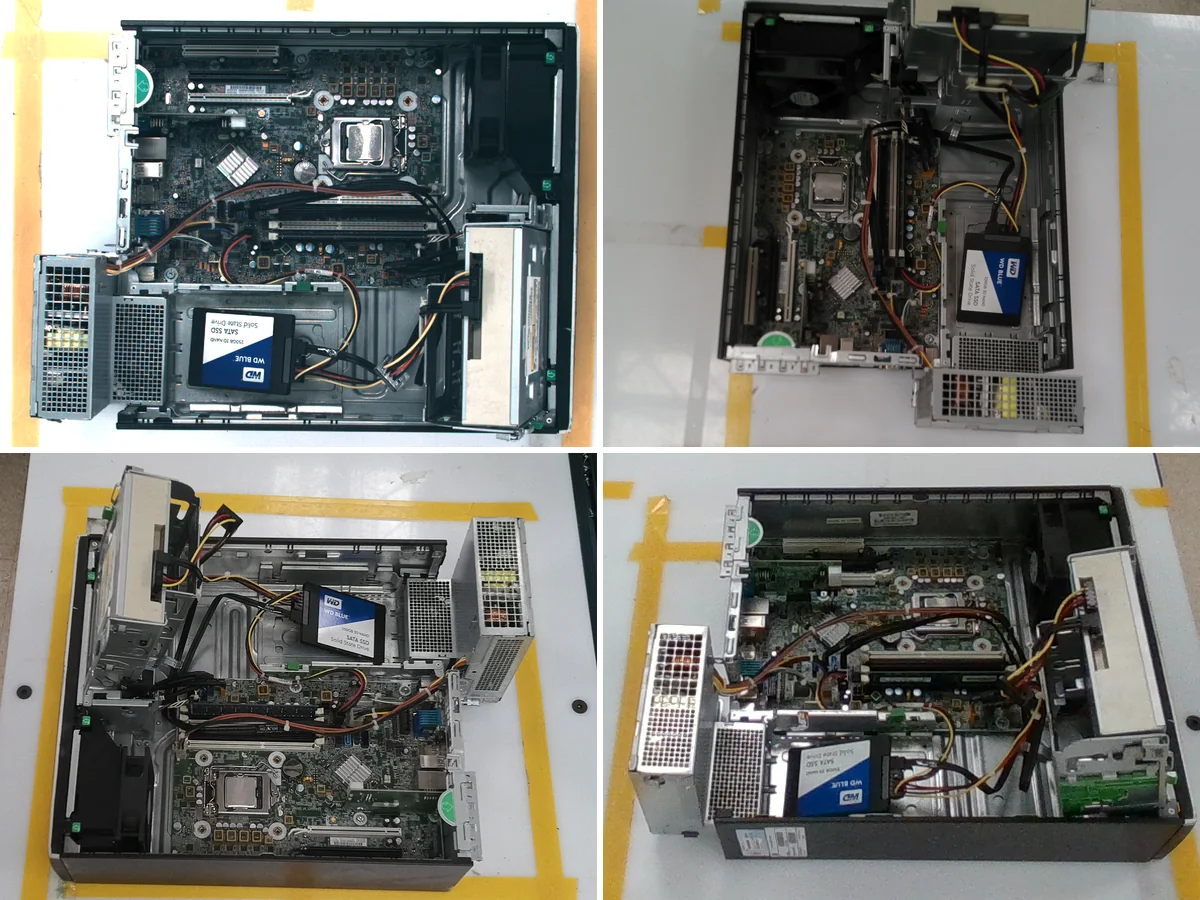
Step 1 is the machine before any action. After every later step, the 3D scanner looking straight down and three cameras record what is left: two OAK cameras, one nearly overhead and one at an angle, and a RealSense camera at an angle. The operation log gives each step its name and its actions: verb, part and tool.
Scanner
raw/scanner/<batch>/<batch>/<NN>/RGB<n>1/: a burst of colour images per step, P_0.png, P_1.png, …
OAK
raw/oak/Desktop NN/Disassemble/Camera_1|2/<step>/: colour JPEG, colour aligned to depth (PNG), raw depth (.npy, .png), point cloud (.ply)
RealSense
raw/realsense/Desktop NN/Disassemble/<step>/ (the folder is named Disassembly for desktops 18 to 22): colour, raw depth (.npy), point cloud (.ply)
Calibration
Calibration/ in each desktop folder of the cameras
Log
annotations/scanner/D<nn>/sequence.json: per step its name, type and actions; verbs: unscrew, disconnect, open, release, remove, displace, reorient
Read it right Every picture of a step is taken after that step's action: on S05 the part removed at step 5 is already gone. Of each scanner burst, frames.json names the image the masks were drawn on.
D24 / Step 10 / Scanner and OAK 1 (top), OAK 2 and RealSense (bottom)
Instance masks
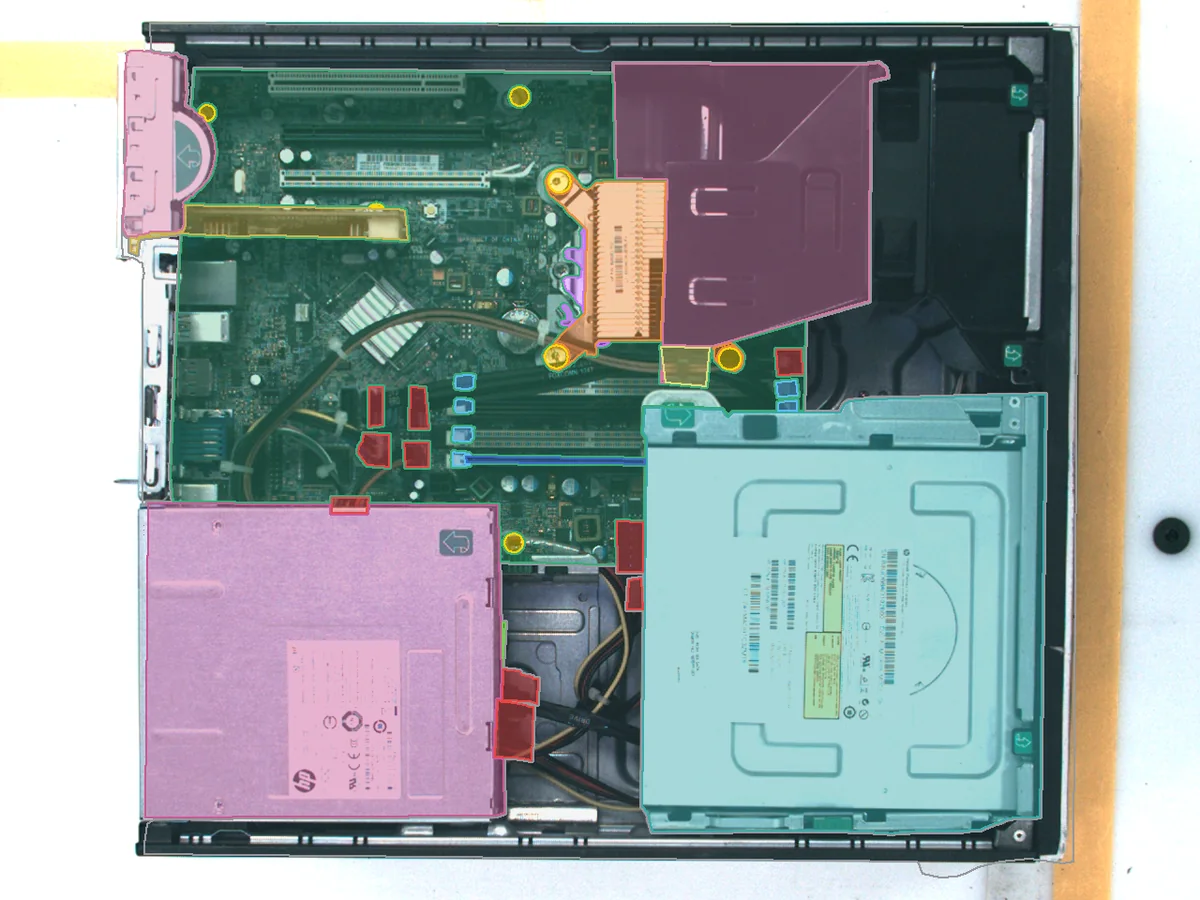
Every scanner frame carries an instance mask for every part it shows, in 24 classes, and every frame was confirmed by a human annotator: 2,800 frames, 3,217 parts, 84,225 annotations.
Folder
annotations/scanner/D<nn>/, one per desktop
Pictures
images/S<nn>.png: the scanner picture of step <nn>, the raw file byte for byte
frames.json (per step), instances.json (per part), sequence.json (steps and state timeline)
Read it right Take pixels from the label map, not from segmentation: where two confirmed masks overlap, the map gives each pixel to one part. instance_id holds within one desktop; join on key.
D24 / Step 01 / Visible masks in class colours
Visible region and complete extent
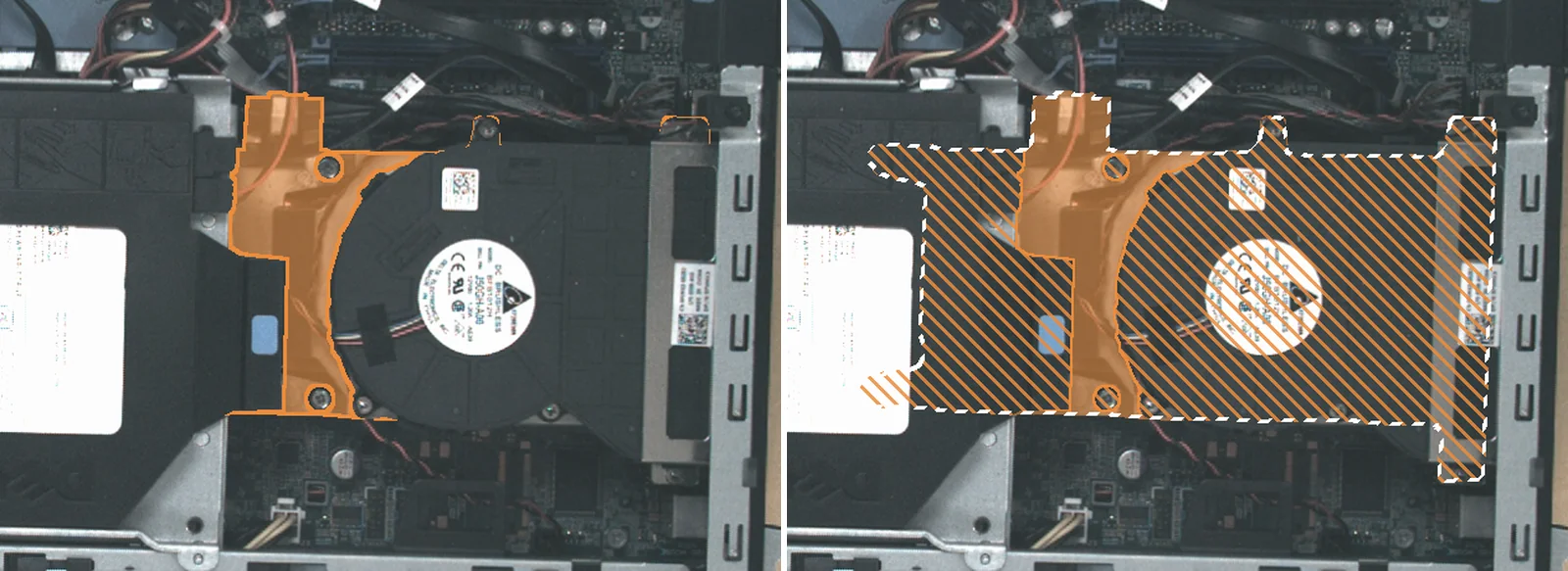
Parts cover each other. Each annotation holds two masks: the region the scanner sees, and the complete extent of the part, including what other parts cover. It also says how much is hidden and by which parts.
Visible
segmentation, bbox, area
Complete extent
amodal_segmentation, amodal_bbox, amodal_area
Hidden
occlusion_ratio (share of the complete extent hidden), occluders ([{"id", "px"}], the parts that hide it)
Label
visibility: visible, visible_tiny, too_small, occluded_partial, occluded_full; clean: not covered at all
Read it right A part labelled visible can still be partly covered; clean is the test for “not covered”. A crowd row (iscrowd: 1) is a part in place but fully covered: empty visible mask, complete extent kept.
D19 / Step 01 / Heatsink under the CPU fan: visible region (left), complete extent (right)
Part states
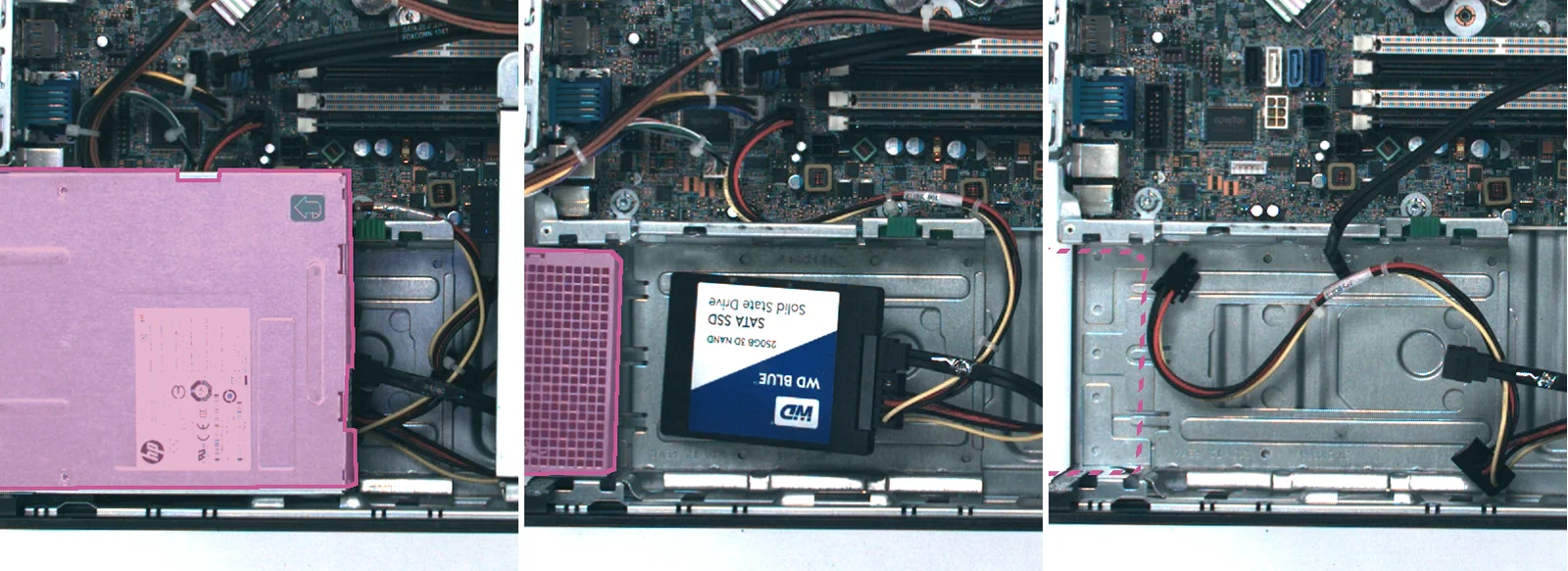
Every part has a state and a placement at every step, so a part can be followed through the whole disassembly, up to the step it leaves the case.
Per step
instances.json: states["<step>"] = state and placement; leaving: the step the part leaves, and the frames before and after
Timeline
sequence.json: timeline, runs of (from, to, state, placement) per part
Relations between parts (connected, fastened, covered, locked, blocked) say what has to come off before a part is free. With the states, they give the removal order. Before the CPU of this desktop could come out:
Read it right An edge reads from the part that waits: {"target": "cpu.01", "type": "locked_by", "blocker": "cpu_socket_lever.01"} means the lever is dealt with before the CPU.
D13 / Step 01 / What comes off before the CPU
Component pictures
After disassembly, the removed parts were laid out on the bench and photographed, and each part was masked on its own, so a part can be recognised outside the machine too: 64 shots, 626 annotations.
the same instance_id and key as the scanner annotations of that desktop
Labels
placement on_bench, state removed; in_sequence: false for a part only the bench shows
3D
The scanner measures depth at most of its pixels, so most of each visible mask is also a set of measured 3D points, in millimetres. Each annotated step has its reconstruction, named like its picture, and every point carries the instance and the class of the part it lies on. Nothing is filled in: a surface the scanner could not see has no points.
Scanner
reconstructions/scanner/D<NN>/S<nn>.ply: x y z in millimetres in the scanner camera frame, red green blue, instance (the value of labels/S<nn>.png at the point's pixel, 0 = none) and category (the COCO class id); format, pixel mapping and checksums in its README.md and manifest.csv, which lists every annotated step.
Parts
select a part's points with instance, or use annotations/scanner/tools/parts3d.py, which cuts each part out of a reconstruction with the masks; steps in HOW_TO_EXTRACT_3D_PARTS.md, route and best frame per part in parts_3d_plan.csv
Cameras
Depth and point clouds of the OAK and RealSense cameras are in raw/ (.npy, .ply)
Read it right The complete extent is a silhouette on the image, not a set of points: the hidden surface of a part was never measured.
D19 / Step 08 / Scanner points in class colours, parts lifted apart
Question-answer pairs
184,263 records in 11 tasks are generated from the masks, states, relations and log. A record keeps what a model is shown (prompt) apart from the truth (label). 5,347 records form the evaluation subset; the tasks and how they are scored are under Benchmark.
Read it right Show a model the prompt only. images/ holds the frames of the evaluation subset; for any other record, the image manifest gives desktop, view and step of each frame.
Records
data/vlm_<unit>.jsonl, units scan, oak1, oak2, multi; one JSON record per line
Prompt
task, images (opaque ids), question, options, marks
Label
answer, evidence, rationale, desktop, step, split
Frames
data/vlm_<unit>.images_manifest.jsonl (id to file), images/<view>/D<nn>/s<nnn>
Subset
eval_v3/: the evaluation records per unit
Reasoning
reasoning/<unit>.jsonl: question, answer and the reasoning in words, per record, for training
PerceptionD19 / Step 03
Question
Count the cpu cooler screws that are still in place in this image.
Answer
{"count": 3}
Reasoning
The cpu cooler screws still in place are counted on the machine as it stands (a screw taken out leaves an empty hole): 3. So the count is 3.
ChangeD56 / Steps 12–13, before and after
Question
Do the pictures before and after show the same machine state, or did something change?
Comparing the two pictures, the SSD storage drive changed between the two moments. So yes, the machine changed.
PlanningD34 / Step 24
Question
Looking at the machine in these pictures, which one of the following actions is possible right now?
take out the RAM module
take out the motherboard
take out the CPU
Answer
{"verb": "remove", "target": "RAM module"}
Reasoning
Take out the RAM module: both its RAM latches are open, so the RAM module can be taken out. Not yet take out the CPU: the CPU socket lever still locks the CPU. Not yet take out the motherboard: the CPU and the RAM module are still mounted on the motherboard and all 6 of its motherboard screws are still in. So the one possible now is: take out the RAM module.
Questions, answers and reasoning are quoted from the records. Only the scanner image is shown here; the change and planning records also show the three cameras of the same moment.
Operator video
Two synchronised video cameras film the bench at an angle from two sides while the operator works. The recordings are cut to the moments of work and paired: 3,179 paired clips, 11.1 hours from 64 desktops, no sound, faces masked. A clip shows the action itself; the scanner frame of the same step shows its result.
Read it right These two video cameras are not the cameras of raw/, which photograph the machine after each step. When the operator looks down, a face mask can overlap the hands.
Folder
video/hand_work_selected/desktop_NN/
Clips
clips/NNNN_video_camera_1.mp4 and clips/NNNN_video_camera_2.mp4, one pair per segment
Montage
video_camera_1.mp4, video_camera_2.mp4: every segment of the desktop in one file per camera
Segments
selected_segments.csv per desktop; all_selected_segments.csv at the top: start and end in each camera's video, duration, the step of the log
Player
index.html plays the two cameras side by side, offline
Robot demonstrations
A robot arm takes single components out in two settings: Fixtured, with parts held in slots on a base plate (1,092 episodes), and On motherboard, with parts still mounted on a board (716 episodes). A base camera and a wrist camera film each episode, recorded frame by frame with the robot's state. They are a separate recording, not the disassembly sequences above.
Folders
raw/robot/on_fixture/raw_data/<component>/, raw/robot/on_motherboard/data/raw_data/<component>/: one episode_*.zip per episode
archive_catalog.jsonl: every archive with its component, frames, bytes and SHA-256
Read it right Frames are Python pickles: open them only from this repository, in an isolated environment. The archives are native recordings, not a LeRobot or RLDS conversion.
RAM module / Fixtured: base and wrist camera; on motherboard: base camera
Each track fixes the input, the output, the metric and the evaluation set. Three tracks have a kit that runs now; the robot track is run on the physical system. The results of current models follow the four tracks.
Kit released
Detection and instance segmentation
Find every part in a top-down scanner image and give its class, box and mask.
Input
One scanner image, 1600 × 1600 pixels, taken after a step.
Output
Class, score, box and mask of each part, over 24 part classes. Masks are scored either as visible masks (a part in place but fully covered is an ignore region) or as complete (amodal) masks.
Metric
COCO AP averaged over IoU 0.50:0.95, for masks and boxes; also AP50, AP75, AP by size, AR, per-class AP and AP by occlusion. Mean AP is taken over the 21 classes that have test instances.
Evaluation set
The test split: 12 desktops, 492 images, 12,930 instances. Splits are by whole desktop (split and counts).
Kit
benchmarks/level1/: COCO split builder, scorer with a self-check, training and prediction scripts for a YOLO segmentation model and a Mask R-CNN.
Answer a question about a disassembly sequence from its images, as one JSON object.
Input
The images of a step from one or more cameras (two moments for questions about a change), with the parts in question outlined, and the question.
Output
A strict JSON answer in the task's format, e.g. a list of boxes, a state, a yes or no, or a removal plan.
Metric
Set per task: accuracy, exact match, F1, a box hit at IoU 0.5, or a replay of a plan on the relations (task table).
Evaluation set
eval_v3: 5,347 questions over 11 tasks, drawn from all 66 desktops; no desktop holds more than a fifth of a task. Each record also carries its desktop's train / test split in label.split.
Kit
vlm/vlmpack_2026-11-05/tools/: self-check, chat converter (OpenAI, Qwen-VL and InternVL formats), scorer with reference lines (chance, most frequent answer, question without its image).
Predict depth from one scanner image; the scanner's own 3D measurement is the reference.
Input
One scanner image, 1600 × 1600 pixels.
Output
A depth map of that image, in metres. A model that gives depth up to a scale is scored after alignment only.
Metric
As predicted: MAE, RMSE, absolute relative error, the share of pixels within a ratio of 1.25, and the median scale (predicted over measured depth). After dividing each prediction by its scale: MAE, RMSE, absolute relative error and the share within 1.05.
Evaluation set
The first step (S01) of D03, D04, D10, D11, D13. The reference comes from reconstructions/scanner/ and covers about half of the pixels of each picture; every desktop counts the same.
Remove the part named in an instruction and put it in the sorting zone, on the real robot.
Input
The instruction, and the images of the wrist and base cameras. Policies learn from 1,808 demonstrations in two settings: parts on a fixture (1,092) and parts on a motherboard (716).
Output
Arm and gripper actions for the whole trial.
Metric
Trials completed. A trial fails when it reaches 150 s or when the operator judges that the robot cannot finish.
Evaluation
On the system the demonstrations were recorded with (a UR5e arm with a Robotiq 2F-85 gripper), with the same instructions and home pose. Fixture: seven part categories, five fixture configurations each, ten trials per configuration (350 trials). Motherboard: 100 trials.
Data
The demonstrations are in raw/robot/ (layout). The track has no offline kit: it is run on the physical system.
Test split: 492 scanner images of 12 desktops, 12,930 parts. Scores from 0 to 100.
Detection (boxes)
Instance segmentation (masks)
Method
AP [95 % interval]
AP50
F1
AP small
AP large
AP [95 % interval]
AP50
F1
Class mIoU
Pixel IoU
YOLO26m-seg
45.0 [41.9, 55.0]
62.9
76.0
14.6
53.3
43.4 [39.9, 52.8]
62.0
75.8
49.7
64.6
Mask R-CNN R50-FPN v2
51.8 [49.3, 58.9]
71.6
76.4
13.4
63.3
44.9 [43.1, 53.0]
64.3
75.0
51.3
76.0
DINOv3 + Mask R-CNN
42.9 [40.1, 52.0]
65.7
73.3
12.6
52.5
38.2 [35.7, 45.6]
63.1
72.4
47.7
70.4
RF-DETR-Seg
56.4 [52.1, 63.7]
72.2
77.2
14.9
69.9
49.6 [47.5, 57.7]
70.8
75.2
57.3
83.1
RF-DETR + frozen SAM 2.1
the boxes of RF-DETR-Seg
34.6 [33.8, 40.5]
56.7
62.2
49.5
54.7
RF-DETR + frozen SAM 3
the boxes of RF-DETR-Seg
35.0 [33.6, 41.1]
57.9
64.6
49.5
54.7
SAM 3, zero-shot
4.8 [4.5, 6.2]
5.7
7.0
0.4
6.0
3.8 [3.5, 5.2]
5.7
6.7
3.4
10.7
SAM 3, fine-tuned
59.3 [56.8, 66.2]
75.3
76.2
16.1
72.4
54.7 [51.9, 61.9]
73.7
75.6
61.7
79.0
AP is COCO average precision, averaged over classes and over IoU thresholds from 0.50 to 0.95; the interval comes from resampling the 12 test desktops 1,000 times. F1 pools matches, false positives and misses over classes and images at IoU 0.50, at a confidence threshold chosen on the validation split. Class mIoU averages over the 21 classes present in the test annotations; pixel IoU is total intersection over total union for all 24 classes. YOLO26m-seg, Mask R-CNN R50-FPN v2 and RF-DETR-Seg are trained end to end; DINOv3 + Mask R-CNN keeps the DINOv3 backbone frozen. SAM 3 takes the 24 class names as text prompts, before and after fine-tuning. The two frozen SAM rows take the boxes, labels and scores of RF-DETR-Seg and only draw the masks.
Visual question answering
663 questions from the 12 test desktops. Scores from 0 to 100, averaged per task; a reply that cannot be parsed scores zero.
Zero-shot
Fine-tuned
With the images
No image
With the images
No image
Task
Metric
Questions
Const.
Qwen
InternVL
GPT-6 Astra
Opus 5.5
GPT-6 Astra
Qwen
InternVL
Qwen
InternVL
Perception
Visible component boxes
Box-set F1
55
8.8
2.5†
0.6
9.8
8.6
–not asked
18.9
17.9
–not asked
–not asked
Component grounding
Grounding score
47
2.1
2.1
4.3
52.1
34.9†
–not asked
51.1
51.1
–not asked
–not asked
Same step across views
Accuracy
37
51.4
43.2
48.6
78.4
70.3
–not asked
86.5
83.8
–not asked
–not asked
Component state or screw count
State/count score
54
27.8
35.2
38.5
71.9
66.3
–not asked
83.3
83.3
–not asked
–not asked
Understanding
Observed operation
Verb + target acc.
54
20.4
3.7
3.7†
24.1
25.9
–not asked
74.1
74.1
–not asked
–not asked
State change
Accuracy
74
51.4
56.8
56.8
59.5
77.0
–not asked
95.9
89.2
–not asked
–not asked
Completed operations
Set F1
58
13.9
5.2
5.2
28.3
20.8
–not asked
75.1
70.4
–not asked
–not asked
Planning
Proposed action feasibility
Accuracy
71
46.5
46.5†
54.9
70.4
66.2
53.5
73.2
63.4
45.1
50.7
Next feasible action categories
Set F1
52
46.5
3.3
2.3
8.4
10.5
–not asked
71.2
65.3
–not asked
–not asked
Target removal plan
Replay success
53
66.0
0.0
0.0
0.0
1.9
0.0
98.1
100.0
67.9
67.9
Constrained removal plan
Replay success
51
5.9
0.0
0.0
2.0
2.0
0.0
49.0
47.1
27.5
27.5
Proposed plan validity
Accuracy
57
50.9
54.4
33.3†
68.4
75.4
63.2
87.7
86.0
63.2
78.9
Models: Qwen3-VL-8B, InternVL3.5-8B, GPT-6 Astra and Claude Opus 5.5, each given the same images in the same order. Fine-tuned: Qwen and InternVL with LoRA on the questions of the training desktops. Const. repeats the most frequent complete reference answer of a row. No image: the planning questions that state a target, an action, a plan, a rule or choices are also asked as text alone; a dash marks questions that need the images. Planning questions can have several right answers: any action of a feasible kind counts, and a removal plan may take any order that meets the prerequisites and reaches the goal. †At least 10 % of the replies failed strict parsing.
Depth from a single image
6 models, zero-shot (none trained on the dataset), on the first step of D03, D04, D10, D11, D13.
As predicted
After one scale factor per image
Model
Output
MAE (m)
RMSE (m)
AbsRel
δ < 1.25
Scale
MAE (m)
RMSE (m)
AbsRel
δ < 1.05
UniDepth V2
Metric
0.398
0.400
0.330
2.96 %
1.334
0.016
0.021
0.014
98.73 %
Depth Anything V2
Metric
0.736
0.748
0.609
0.00 %
1.650
0.046
0.071
0.040
71.49 %
Depth Pro
Metric
0.980
0.989
0.811
0.00 %
1.862
0.038
0.061
0.033
72.37 %
Metric3D v2
Metric
2.073
2.078
1.718
0.00 %
2.754
0.023
0.034
0.019
86.66 %
Pi3X
Approximately metric
1.214
1.218
1.010
0.00 %
2.023
0.062
0.072
0.052
50.37 %
DA3-BASE
Relative
–not defined
–not defined
–not defined
–not defined
0.762‡
0.029
0.035
0.024
90.58 %
Lower is better for MAE, RMSE and AbsRel, higher for the two δ columns; δ < t is the share of pixels where the larger of predicted over measured and measured over predicted depth is below t. Scale is the median of predicted over measured depth (1 is exact): the models that give metric depth place the machine too far away. ‡This model gives relative depth, so its factor only describes the output and its unscaled errors are not defined.
Robot disassembly
Trials on the real robot, each with the part in a slightly different position.
Policy
Setting
Completed
Trials
Rate
π0.5
Parts on a fixture
83
350
23.7 %
OpenVLA-OFT
Parts on a fixture
0
350
0.0 %
π0.5
Parts on the motherboard
5
100
5.0 %
Fixture: OpenVLA-OFT and π0.5 are each fine-tuned with LoRA for 50,000 steps on the fixtured demonstrations of all seven part categories, then run for ten trials on each of five fixture configurations per category; trials with memory modules and connectors are spread over the slots. Motherboard: a separate π0.5 policy, trained on the first round of motherboard demonstrations, removes parts that are still installed on a motherboard taken out of its case.
Detection and instance segmentation
Split and counts
Desktops, images and instances per split
Split
Desktops
Images
Instances
Train
48
2,051
57,647
Validation
6
257
6,785
Test
12
492
12,930
Test desktops
D04D10D15D20D24D30D31D32D46D48D49D65
Validation desktops
D03D21D33D35D41D60 The default, drawn from the train desktops with a fixed seed. It shares model platforms with train, so use it to choose checkpoints and report the test split.
Train desktops
All the others. Train and test share no model platform.
Instances
Visible ground truth. Parts in place but fully covered are ignore regions and are not counted.
Predictions
A COCO results list on the full 1600 × 1600 frame, with the pack's category ids.
Visual question answering
Tasks of the evaluation set
The question-answer tasks: what is asked, how it is scored and how many questions the evaluation set holds
Task
What is asked
Scored by
Questions
Perception
V1Visible component boxes
Every part visible in one image, with its class and box.
F1 over class-and-box matches at IoU 0.5 or more.
Questions: 300
V8Component grounding
The box of a part named in the question.
Hit when the box overlaps the true box at IoU 0.5 or more.
Questions: 300
V2Component state or screw count
The state of a marked part, or "cannot tell" when the image does not show it; or how many screws of one kind are still in place.
Exact match; a screw count that is off by one earns partial credit.
Questions: 300
V15Same step across views
Whether two images from two cameras show the same step.
Accuracy.
Questions: 400
Understanding
V3Observed operation
What was done between two moments: the operation and the part it was done to; asked without a hint, with a hint box, and over a span of steps.
Correct when verb and target are both right; over a span, F1 over the action groups.
Questions: 900
V12State change
Whether anything changed between two moments, from neighbouring steps to several steps apart.
Accuracy.
Questions: 800
V10Completed operations
Which operations have been carried out so far, and how far the disassembly has got.
F1 over the completed and started operations; accuracy of the progress bin.
Questions: 300
Planning
V4Proposed action feasibility
Whether an action on a marked part can be done now and, if not, which parts have to be dealt with first.
Accuracy of the yes or no; F1 over the parts named as blocking.
Questions: 400
V6Next feasible action
Every action that can be done now; also as multiple choice, and under one added rule.
F1 over the groups of feasible actions; accuracy for the multiple choice.
Questions: 747
V7Removal plan
A plan that takes a named part out, free or under one added rule.
The plan is replayed on the relations: valid, goal reached, recall of the required steps.
Questions: 600
V16Proposed plan validity
Whether a proposed sequence of actions can be carried out, and the first step that cannot.
Replayed step by step on the relations: accuracy of the validity and of the first wrong step.
Questions: 300
All 11 tasks
Questions: 5,347
A task's count covers all its forms: V3 is asked without a hint, with a hint box and over a span of steps; V6 open, as multiple choice and under an added rule; V7 free and under an added rule; V12 for neighbouring steps and over a span. Replies are parsed strictly (one JSON object) and leniently, and both are reported.
Licence, citation and questions
Licence and use
Pre-release
A licence comes with the first tagged release. Until then the data is provided for inspection and for research evaluation.
Please do not redistribute copies of the data, and do not use it to train models you intend to release, without our permission. Annotations may still change before that release.
These terms are for the data. The code in the code repository is released under the MIT licence.
Every desktop is a real, used computer that had been retired from service, from one of several brands. Each one was disassembled by hand, one step at a time.
Which views carry annotations?
The scanner view, which looks straight down on the assembly: its images carry the instance masks, the part states and the relations. The three camera views are recorded after every step as well.
Are faces visible in the operator video?
No. Faces are masked in every frame of the published clips.
Where are the scanner's 3D reconstructions?
In reconstructions/scanner/: one PLY per annotated step of 66 desktops, every point labelled with its part. The home page's explorer shows some of them in 3D. The depth and point clouds of the three cameras are in raw/, as is the robot data.
Why does the repository have a different name?
The Hugging Face repository, E3D-Desktop-Disassembly, still carries the dataset's earlier name. It holds the same data as EoL3D.